
So Matt if you see this, how does one change a title? It may be why none have shown the portrait study with the oil pastels we are working on? I put it as Mon instead of Wednesdays?
Would be good to be able to fix it! Thanks again for all the help in art you are teaching us. I just love the live classes so much!
Therese
1 Like
Hi @theresebriggs ,
Try to go to the topic you would like to change the title of.
Scroll up so you can see the title (and the very first comment that was created).
You will see a little pencil next to the title, click on that pencil:

After that you will see that you are able to change the title (so you can change the word “monday” to “wednesday” or whatever you like to call it).
After that you click on the tick:

That’s how it should work.
Let me know if it was ok or you have an additional question to this 
(I am not sure if you are using a phone or a laptop, I took pictures on a phone, but it should be the same idea on a computer)
Good luck,
Lucy
1 Like
Thanks for sharing the How To @Lucy. I’ve not needed to do this before, but now i know I can if the need arrives.
Terri Robichon
1 Like
Thx Lucy for such a great detailed answer…I sure appreciate it!
I’ll go try and fix it now! That’s why I think Matt can’t find it cuz I had it named wrong!
So I looked for the pen icon Lucy but the only one I see is when I edit what I wrote like this…the title page on the computer doesn’t have a pen? Oh well we all know it’s Wed with Matt and Ashley by now! LOL
thanks for trying!
Therese

-9+
Lucy, here’s what it looks like on a computer
(sorry for the light blare from the top of the page)
Therese
Hi @theresebriggs ,
I see. It looks a little bit different than on the mobile. So I went to my PC and tried it out.
The little pencil is not visible, but you can still change the name of the topic.
So go up to the first comment as you did before and hover over the topic name with your mouse. And just directly click on the name of the topic. It should let you change it.
This how it looked like when I tried:
Hover over the name of the topic with a mouse (I saw the pencil appearing at the end when I move my mouse on the topic name, but thats not important)

Click directly on it, you should see that you can change it now:
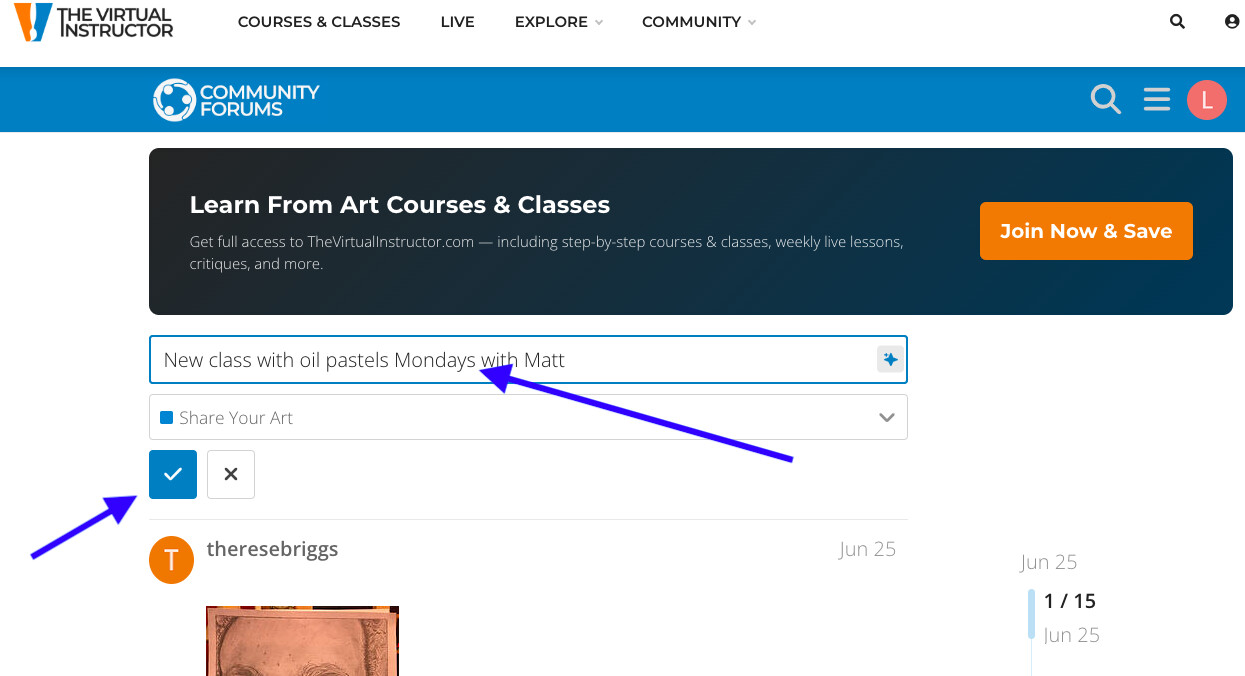
Change the name and confirm with a little tick  .
.
Try it out and let me know if it worked 
Lucy
ok I’ll try that!
Thx again Lucy!
1 Like
Still nothing to be able to change title here? Oh welll thanks for trying Lucy! I do think it’s my computer skills to blame!
Tree
@theresebriggs Really? Oh, I am sorry then. I can try to change it for you if you like.
Just tell me which one and how you want to change it and I can try.
Lucy
Sure Lucy if you want?
It should say
"Oil Pastels Wednesday’s Live class with Matt and Ashley "
Thx Lucy …hope we all enter our portraits of Reynolds!
Therese